
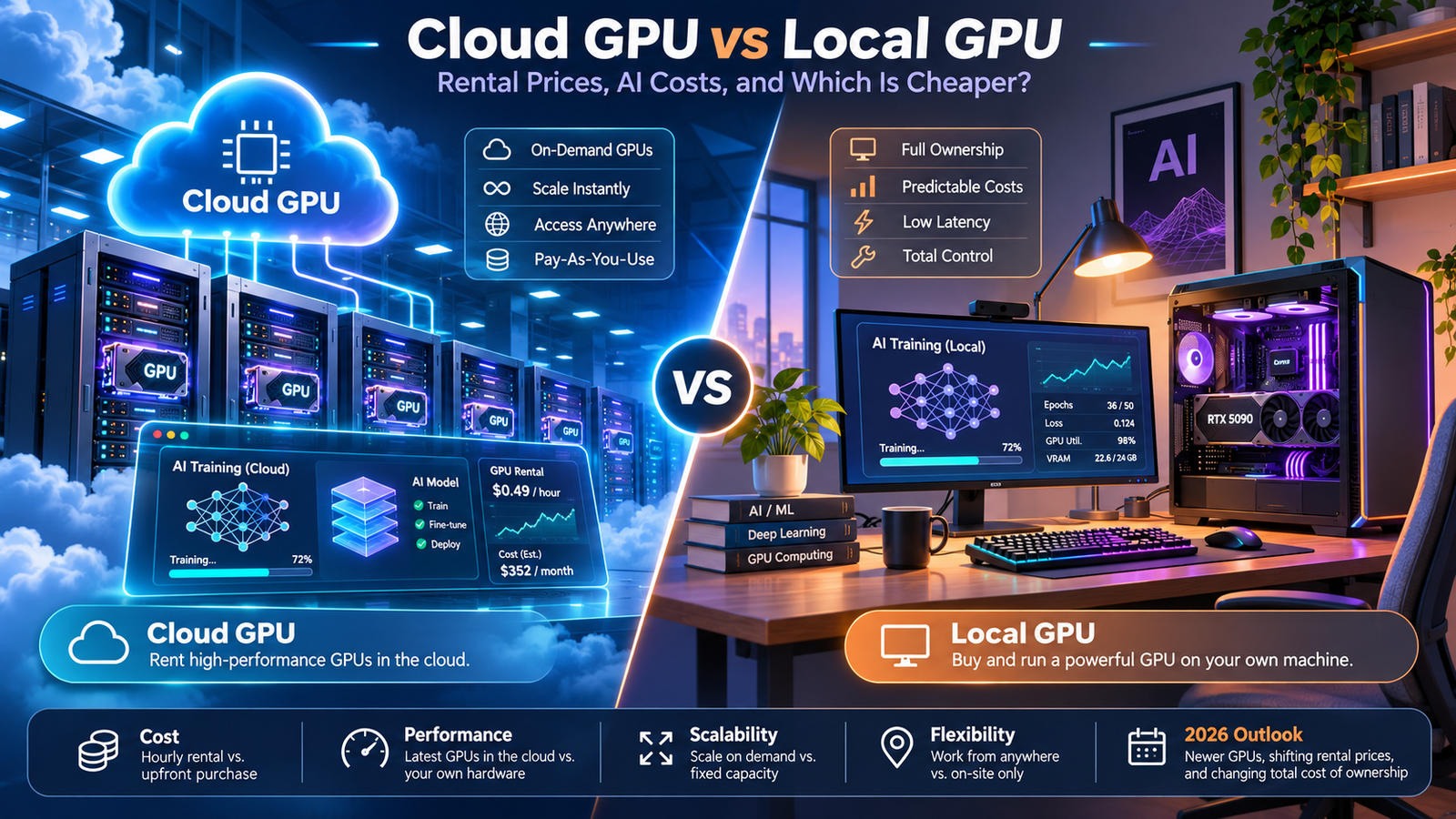
Cloud GPU computing has become an important option for developers, video editors, 3D artists, researchers, and businesses that need powerful graphics processing hardware. However, one question remains: Is it cheaper to rent a cloud GPU or buy a graphics card in 2026?
The answer depends on your workload, budget, GPU performance requirements, and how frequently you use the hardware. Some people save hundreds of dollars by renting GPU servers for occasional projects, while others benefit from purchasing their own graphics cards for regular work.
A powerful local GPU gives you direct control over your hardware without paying hourly rental charges. Cloud GPU services, on the other hand, allow you to access expensive NVIDIA graphics processors without buying a complete workstation.
In this detailed guide, we compare cloud GPU vs local GPU costs in 2026, including rental pricing, electricity expenses, AI model requirements, performance considerations, and long-term ownership costs.
What Is a Cloud GPU?
A cloud GPU is a graphics processing unit installed in a remote data center that customers can access over the internet.
Instead of purchasing an expensive graphics card, you rent computing resources from a cloud service provider. The provider maintains the GPU servers, power infrastructure, networking equipment, and cooling systems.
Cloud GPUs are commonly used for artificial intelligence, machine learning, 3D rendering, scientific computing, and other workloads requiring large amounts of parallel processing power.
For example, imagine that a developer needs an NVIDIA H100 GPU to experiment with a large AI model. Purchasing enterprise-class hardware and building a suitable server could require a substantial investment.
Cloud GPU rental allows that developer to access similar computing capabilities for a limited period without buying the physical equipment.
Services such as Runpod and Lambda Cloud provide GPU computing resources with different hardware configurations, rental arrangements, and pricing structures.
This makes cloud computing especially attractive for people who need powerful GPU hardware but cannot justify purchasing it.
What Is a Local GPU?
A local GPU is a graphics card physically installed inside your desktop computer or workstation.
Popular examples include NVIDIA GeForce RTX graphics cards and AMD Radeon GPUs.
Local graphics cards handle gaming, video editing, image processing, 3D rendering, and other tasks that benefit from GPU acceleration.
Unlike cloud GPU services, local hardware requires an upfront purchase. However, after buying the graphics card, you do not pay a separate hourly rental charge to use it.
You remain responsible for electricity consumption, cooling, system maintenance, component compatibility, and future replacements.
A local GPU also allows you to work without a continuous internet connection when the software and required files are installed on your computer.
For many people who use GPU-intensive software every day, local hardware can become more economical over time.
Cloud GPU Pricing in 2026: How Much Does GPU Rental Cost?
Cloud GPU rental prices depend on the hardware model, video memory, server configuration, provider, and availability.
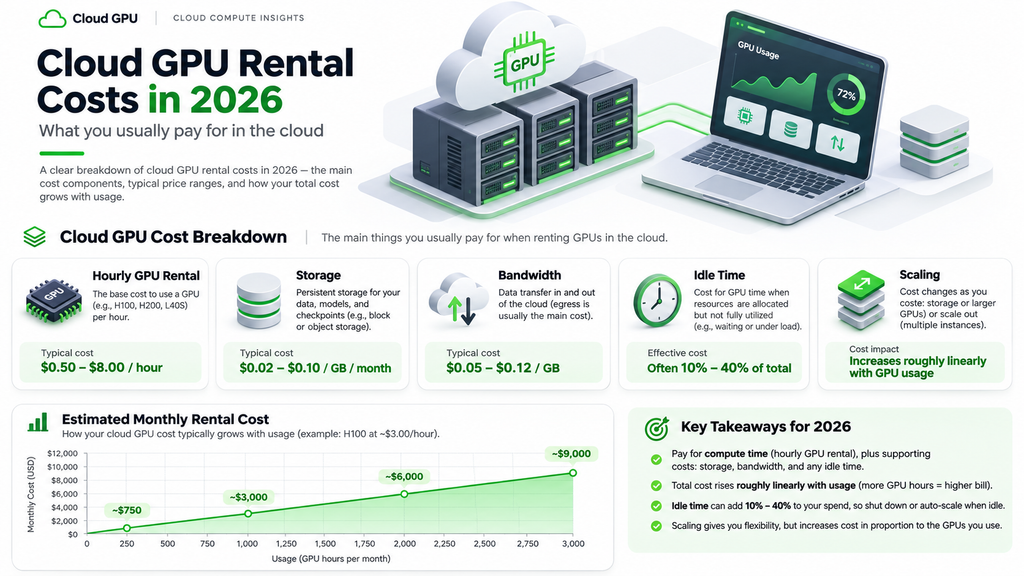
As of October 8, 2026, Runpod’s published GPU pricing listed several examples of hourly rates. Its RTX A5000 with 24GB VRAM was listed at $0.27 per hour, RTX 4090 with 24GB at $0.89 per hour, and RTX 5090 with 32GB at $1.19 per hour.
For more demanding computing workloads, the provider listed an NVIDIA A100 PCIe with 80GB at $1.79 per hour and an H100 PCIe with 80GB at $2.89 per hour.
These prices illustrate the wide range of GPU rental options available. They are provider-listed examples rather than permanent market rates or guaranteed prices for every configuration.
Actual charges may vary based on the cloud plan, deployment region, storage requirements, and other services.
Enterprise GPU providers can offer additional options such as reserved instances, multi-GPU servers, and specialized infrastructure for large-scale AI workloads.
Before choosing a GPU rental company, review the latest pricing directly on its official website and compare the total expected cost.
How to Calculate Your Monthly Cloud GPU Cost
Calculating basic cloud GPU expenses is straightforward.
Multiply the hourly rental price by the number of hours you expect to use the GPU.
For example, suppose you rent an NVIDIA RTX 4090 cloud instance for $0.89 per hour.
If you use the instance for 20 hours in one month, your basic GPU computing bill would be $17.80. At 80 hours, the cost becomes $71.20. At 200 hours, it reaches $178.
These calculations exclude additional charges such as storage, applicable taxes, and other billable services.
Now imagine that you use the same instance for 200 hours every month for an entire year.
Your annual GPU rental expense would be approximately $2,136 before additional charges.
This example shows why cloud GPUs can be economical for occasional projects but potentially expensive for frequent users.
A short AI experiment may cost only a few dollars, while a continuously running AI application can generate substantial monthly bills.
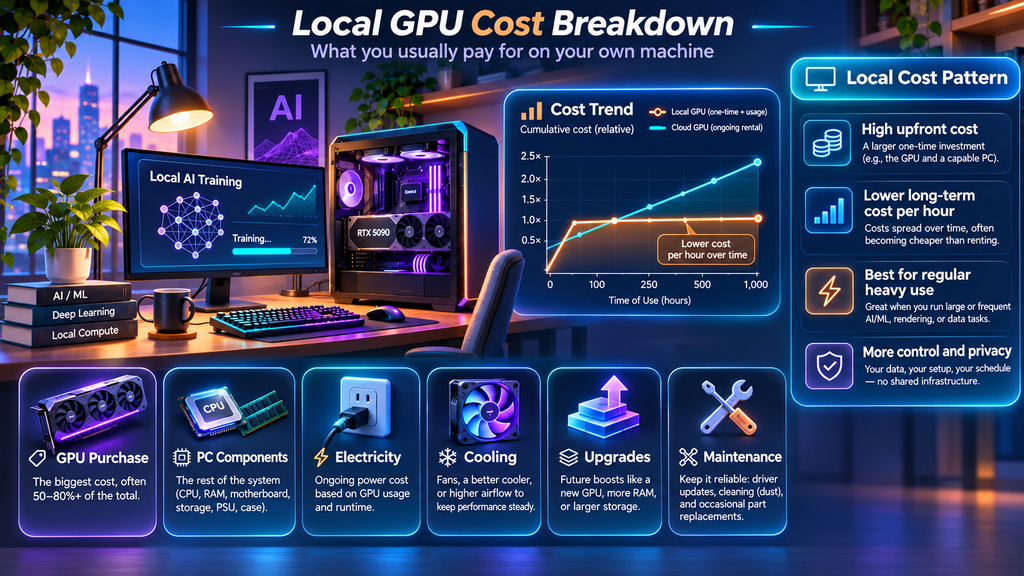
How Much Does a Local GPU Cost in 2026?
Buying a local GPU requires a larger initial payment, particularly if you want high-end performance.
Graphics card prices vary considerably according to performance, memory capacity, brand, availability, and current demand.
A basic graphics card suitable for light gaming and modest workloads may cost a few hundred dollars, while premium models can cost well over $1,000.
For reference, NVIDIA introduced the GeForce RTX 5090 with a $1,999 starting price, although actual retailer prices and availability may differ substantially.
The RTX 5090 includes 32GB of GDDR7 video memory, making it relevant for demanding creative applications and some local AI workloads.
However, buying the GPU is only part of the investment.
You may also need a compatible motherboard, sufficiently powerful power supply, system memory, storage, and cooling.
If you already own a capable workstation, replacing the graphics card may be relatively simple.
If your existing computer is outdated, purchasing a new GPU might require upgrading several other components.
That is why comparing the graphics card price alone against cloud rental prices can produce misleading results.
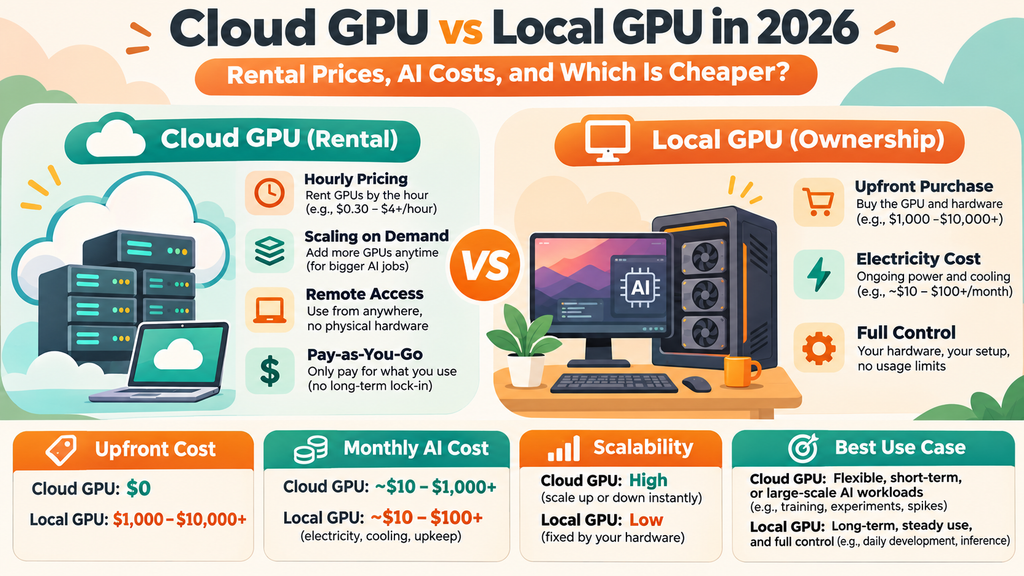
Cloud GPU vs Local GPU: Comparing the Total Cost
The most useful comparison involves calculating the total cost of each option over the same period.
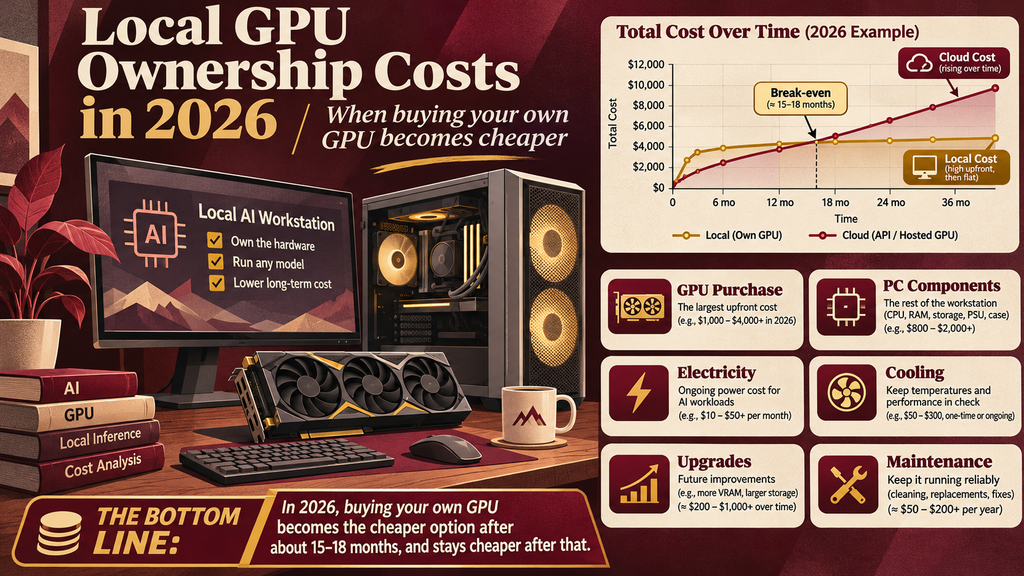
Consider a hypothetical workstation that costs $2,400 to purchase or upgrade for a particular GPU workload.
Now compare it against a cloud instance priced at $0.89 per hour.
At 150 hours of GPU usage per month, the cloud instance would cost approximately $133.50 monthly before extra charges.
Over 24 months, that adds up to $3,204 in basic rental fees.
If the local workstation consumes an average of 550 watts during those 150 monthly working hours, and electricity costs $0.15 per kilowatt-hour, its estimated electricity cost would be approximately $12.38 per month.
Over 24 months, the hypothetical local workstation would cost about $2,697 including its original $2,400 purchase price and this estimated workload electricity expense.
This calculation suggests that local ownership could become cheaper for this particular usage pattern.
However, it is only an illustration. It does not include repairs, internet costs, taxes, cloud storage charges, resale value, or the workstation’s electricity use outside the specified working hours.
More importantly, the cloud GPU and local GPU must offer comparable real-world performance for the calculation to be meaningful.
When Is Renting a Cloud GPU Cheaper?
Renting a GPU is often attractive when you only need powerful computing hardware occasionally.
For example, a student experimenting with machine learning might require GPU acceleration for a few hours each week.
Purchasing a premium workstation for that limited amount of usage could be difficult to justify financially.
Cloud rental allows the student to pay for the resources actually used rather than purchasing expensive equipment that remains idle most of the time.
Freelance developers may face similar situations. A project could require a large GPU for one week, followed by several months without demanding computing tasks.
In such cases, renting hardware may be more sensible than ownership.
Cloud services can also provide temporary access to enterprise GPUs that are impractical to install in a typical desktop computer.
For short-term workloads, flexibility can be more valuable than ownership.
When Is Buying a Local GPU Better?
Buying a graphics card becomes more attractive when you regularly use GPU-intensive applications and plan to continue doing so.
Someone who edits videos daily, works with 3D software, develops AI applications locally, or plays modern PC games may receive more value from dedicated hardware.
A local GPU does not generate hourly rental charges every time you open a program.
You also have direct access to your files, peripherals, and installed software without relying on remote computing resources.
However, ownership is not free. Electricity, cooling, maintenance, and replacement costs must still be considered.
Local GPUs also depreciate as newer models become available.
The strongest reason to buy is consistent utilization combined with a workload that your hardware can handle efficiently.
Best GPU for AI and Machine Learning in 2026
Choosing a GPU for AI workloads is different from choosing a graphics card for gaming.
For gaming, frame rates, ray-tracing performance, driver support, and display features are important.
For machine learning, GPU memory capacity, supported numerical formats, software compatibility, memory bandwidth, and processing throughput can be more relevant.
Consumer GPUs such as the RTX 4090 and RTX 5090 can provide powerful acceleration for selected AI workloads.
Enterprise GPUs such as the NVIDIA A100 and H100 offer features and memory configurations designed for demanding data-center computing.
However, the most expensive GPU is not automatically the right choice.
A small machine learning experiment may run efficiently on an affordable consumer GPU, while training or serving a larger model may demand enterprise-class hardware.
Before selecting a GPU, check the actual requirements of the AI model, framework, and software you plan to use.
How Much VRAM Do You Need for AI?
Video memory is one of the most important factors when comparing cloud and local GPUs.
AI models use GPU memory to store model weights, intermediate calculations, attention data, and other resources needed during processing.
A GPU with insufficient VRAM may fail to load a model or require slower methods that transfer data between GPU and system memory.
For some smaller or quantized AI models, a 12GB or 16GB GPU may be sufficient.
A 24GB graphics card provides additional flexibility for larger models, longer contexts, or more complex workflows.
Cards with 32GB can support more demanding workloads, while enterprise GPUs with 80GB or more provide substantially greater memory capacity.
Nevertheless, there is no universal VRAM requirement for artificial intelligence.
The necessary memory depends on the model architecture, parameter count, precision, batch size, sequence length, and whether the task involves inference, fine-tuning, or full training.
To understand graphics memory fundamentals, see our guide on how much VRAM you need in 2026. That article focuses on gaming, so AI-specific requirements must be evaluated separately.
Cloud GPU Hosting for AI Applications
Businesses developing AI applications often need reliable GPU infrastructure to handle customer requests.
For example, an AI-powered application might process documents, generate images, analyze data, or run language models.
A local desktop GPU can be useful for development, but running a public application may require additional considerations such as uptime, network reliability, security, and scalability.
Cloud GPU hosting allows a business to deploy workloads on remote infrastructure and adjust the amount of computing capacity as demand changes.
Some services support serverless GPU inference, which can be useful when applications receive irregular request volumes.
However, serverless pricing and behavior differ from renting a dedicated GPU instance. Cold starts, minimum billing periods, and concurrency limits can affect cost and performance.
A company should compare these arrangements using its actual expected traffic rather than choosing based solely on the lowest advertised hourly rate.
For production services, reliability and predictable operating expenses are just as important as GPU speed.
Cloud GPU for 3D Rendering and Video Editing
Cloud GPU computing is also useful for professional creative work.
Complex 3D scenes can require substantial processing resources, especially when using demanding rendering techniques, large textures, and high-resolution output.
A professional animator working on a short commercial project might prefer renting powerful GPU hardware rather than purchasing a dedicated rendering workstation.
Similarly, some video production workflows can benefit from remote computing resources for encoding, visual effects, and rendering.
However, using cloud GPUs with creative applications requires checking software licensing, renderer support, remote desktop availability, and file transfer requirements.
Large video files and 3D projects can take considerable time to upload, depending on your internet connection.
Remote hardware is therefore not necessarily faster or cheaper for every project.
For smaller editing workloads, a capable local GPU may provide a more convenient experience.
Electricity Costs: Are Local GPUs Expensive to Run?
Electricity consumption matters when calculating long-term local GPU ownership costs.
A graphics card’s power draw changes according to its workload, model, and power settings.
For example, MSI lists a 575W power consumption specification for its GeForce RTX 5090 VANGUARD SOC graphics card.
That does not mean the entire computer always consumes exactly 575 watts. The actual system draw includes other components and varies during use.
To estimate electricity expenses, multiply average system power consumption in kilowatts by operating hours and your electricity rate.
A computer averaging 500 watts during 100 hours of GPU-intensive work consumes approximately 50 kilowatt-hours.
At an illustrative electricity price of $0.15 per kilowatt-hour, that costs $7.50.
Your actual bill may differ based on local electricity tariffs, cooling requirements, and measured system consumption.
Cloud providers include power infrastructure in their computing service, although the charges may be reflected indirectly through rental pricing.
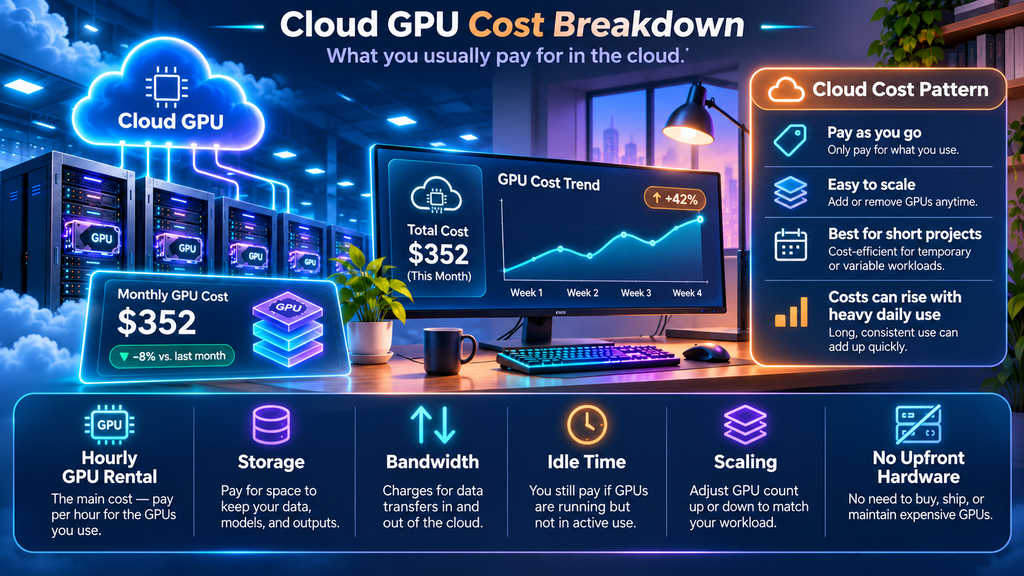
Hidden Costs of Cloud GPU Rental
Hourly GPU pricing is not the only expense associated with cloud computing.
Some services charge for persistent storage, meaning you may continue paying to retain project files even when your GPU instance is not actively processing tasks.
For example, Runpod publishes separate storage pricing for different volume types and usage states.
Other potential costs include data transfers, network resources, backups, reserved capacity, and support plans, depending on the provider.
Idle resources can also create unexpected expenses.
A user who leaves a paid instance running overnight may continue to incur charges even if the GPU is not performing useful work.
Stopping GPU computation may not always remove storage or other associated billing.
Therefore, users should monitor billing dashboards, understand the difference between stopping and terminating an instance, and review storage charges before choosing a platform.
Security and Privacy: Cloud GPU vs Local GPU
Security should also influence your decision.
With a local GPU, you can keep sensitive datasets on hardware under your direct control. However, maintaining operating system security, backups, and physical protection remains your responsibility.
Cloud GPU providers manage parts of the underlying infrastructure, but users are often responsible for securing accounts, access keys, containers, applications, and stored information.
When handling private business files or customer information, review the provider’s security policies, data processing terms, and available deployment regions.
Avoid uploading sensitive datasets without appropriate authorization or safeguards.
For organizations with strict compliance requirements, infrastructure location and access controls can be more important than the hourly cost.
Neither cloud computing nor local ownership automatically guarantees stronger security.
Can You Use Cloud GPUs for Gaming?
Cloud GPUs are primarily marketed for computing workloads such as artificial intelligence and rendering.
Although some remote GPU systems can technically run games, ordinary AI GPU hosting is not equivalent to a dedicated cloud gaming service.
Gaming requires low-latency video streaming, suitable display encoding, controller or keyboard input, game compatibility, and compliance with platform terms.
A rented AI server may lack the software environment or licensing permissions required for consumer gaming.
For regular PC gaming, a local graphics card generally provides a more straightforward experience.
If your main goal is gaming performance, it is better to compare CPU and GPU combinations based on actual game benchmarks rather than AI server rental specifications.
Our guide to the best CPU and GPU combinations for gaming in 2026 explains how to build a balanced gaming system.
How to Choose the Right Cloud GPU Provider
Selecting a cloud GPU service requires more research than comparing advertised hourly prices.
First, identify the hardware and memory required by your software. A low-cost GPU is not useful if it cannot run your workload.
Next, confirm that the provider supports your development environment, operating system, GPU drivers, and preferred machine learning frameworks.
Review whether the service provides dedicated instances, shared resources, or serverless computing.
The billing arrangement should match your expected usage pattern.
For short experiments, flexible usage-based billing can be attractive. Long-running workloads may benefit from negotiated or reserved pricing, although commitments introduce additional considerations.
Finally, consider storage charges, deployment regions, support quality, uptime expectations, and security requirements.
Choosing the cheapest option without reviewing these details can produce larger expenses later.
How to Reduce GPU Cloud Computing Expenses
Cloud GPU users can often control costs by matching hardware to the workload instead of selecting the most powerful available processor.
If a task runs efficiently on a GPU with 24GB of memory, renting an expensive enterprise model may offer limited financial benefit.
Testing different configurations can help identify the lowest-cost option that meets your performance requirements.
Batching jobs, reducing unnecessary idle time, and shutting down unused resources can also limit spending.
For suitable machine learning tasks, mixed precision or model quantization may reduce memory requirements, although both approaches must be evaluated for accuracy and compatibility.
Some providers offer lower-cost interruptible or spot-style resources for workloads that can tolerate interruptions.
These options are not appropriate for every application, but they may be useful for experiments and restartable batch processing.
The goal should be to minimize the total cost of completing a job, not simply the advertised price per GPU-hour.
Frequently Asked Questions
Is cloud GPU cheaper than buying a graphics card?
Cloud GPU rental can be cheaper for occasional or short-term workloads because it avoids a large initial hardware purchase. Buying a GPU may become more economical for people who need comparable computing performance regularly over a long period.
How much does it cost to rent a GPU for AI in 2026?
Rental prices vary substantially by provider and hardware. As of October 2026, selected Runpod listings ranged from approximately $0.27 per hour for an RTX A5000 to $2.89 per hour for an H100 PCIe, with additional options at higher prices.
Can I train AI models on a gaming GPU?
Yes. Many machine learning frameworks support compatible consumer GPUs. However, memory capacity, driver support, model size, and training requirements determine whether a particular gaming GPU is practical.
Is an RTX 5090 good for local AI?
The RTX 5090 offers 32GB of graphics memory and substantial processing capability, making it useful for selected local AI workloads. Nevertheless, very large models or demanding training tasks may need significantly more memory or multiple GPUs.
Do cloud GPUs charge when they are not being used?
This depends on the provider and resource state. An active instance may continue generating charges even when idle. Storage, reserved capacity, or other services may also remain billable after computation stops.
Which is better for video editing: cloud GPU or local GPU?
For everyday editing, a local GPU can provide a convenient workflow without repeated file uploads. Cloud processing may be attractive for occasional demanding rendering tasks, provided the software, internet connection, and pricing arrangement are suitable.
Is renting an H100 GPU worth it?
Renting an H100 can be worthwhile when your workload benefits from its memory capacity, compute capabilities, and supported software environment. Smaller workloads may run more economically on less expensive GPUs.
Final Verdict: Cloud GPU or Local GPU in 2026?
There is no single winner in the cloud GPU vs local GPU comparison.
Cloud GPU rental offers flexibility, fast access to powerful computing hardware, and reduced upfront investment. It is particularly attractive for occasional AI experiments, temporary development projects, and workloads that exceed the capabilities of ordinary desktop computers.
Local GPUs offer direct hardware control, convenient offline use, and potentially lower long-term costs for frequent users.
The best decision comes from comparing workload performance, total operating hours, upfront costs, electricity expenses, rental pricing, and long-term requirements.
Before renting or purchasing, calculate the expected cost over at least twelve months and confirm that the selected GPU can support your actual applications.
A careful comparison can help developers, creators, researchers, and businesses choose computing hardware that delivers the performance they need without unnecessary spending.